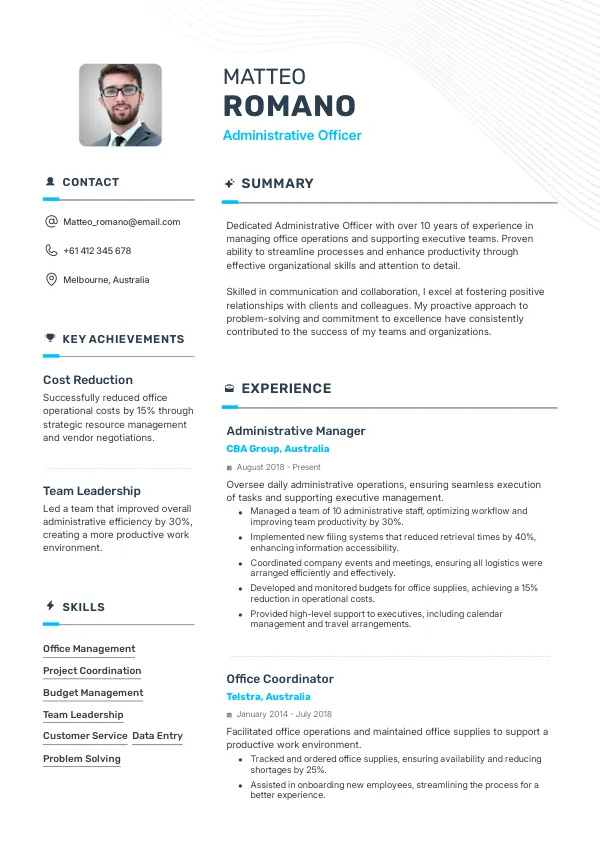
Introduction
Applying for administrative roles in Australia can be competitive, with many candidates vying for the same positions. A resume or CV filled with errors can severely hinder your chances of getting noticed by recruiters. It’s essential to check your resume for common mistakes early on to avoid repeated rejections.
How Recruiters Evaluate Your Resume
Recruiters in Australia often use automated Applicant Tracking Systems (ATS) to screen resumes. This means many candidates are rejected due to unnoticed issues, such as formatting or keyword relevance. A thorough review of your resume can help identify these hidden mistakes, improving your chances of making it through initial screenings.
Without an external review, you might miss critical errors that could be easily fixed. Consider using mistakes.cv for a professional evaluation of your resume.
Get a detailed resume review to spot hidden mistakes.
Review NowCommon Resume Mistakes
Mistake #1 – Poor Formatting
Why this hurts
Poor formatting can make your resume hard to read, leading to frustration for recruiters. Simple mistakes like inconsistent font sizes or spacing can distract from your qualifications.
Example
- Bad: Use of multiple font types and sizes.
- Better: Consistent use of one font type and size throughout.
How to fix
- Use a clean, professional template and maintain consistent formatting.
Mistake #2 – Generic Objective Statement
Why this hurts
A vague or generic objective doesn’t convey your specific interest in the role. Recruiters prefer tailored statements that reflect your goals and fit the job description.
Example
- Bad: “Seeking a challenging position.”
- Better: “Looking to leverage my organizational skills in an administrative assistant role.”
How to fix
- Customize your objective statement for each application to align with the job's requirements.
Mistake #3 – Listing Duties Instead of Achievements
Why this hurts
Simply listing job duties can make your resume blend in with others. Recruiters want to see how you added value in your previous roles.
Example
- Bad: “Managed office supplies.”
- Better: “Reduced office supply costs by 20% through strategic vendor negotiations.”
How to fix
- Focus on quantifiable achievements that demonstrate your impact.
Mistake #4 – Ignoring Keywords
Why this hurts
Failing to include relevant keywords can lead to your resume being filtered out by ATS. Recruiters search for specific terms related to the role.
Example
- Bad: Not mentioning “document management.”
- Better: Including “document management” in your skills section.
How to fix
- Analyze the job description for keywords and incorporate them naturally into your resume.
Mistake #5 – Using Unprofessional Email Addresses
Why this hurts
An unprofessional email address can create a negative impression. Recruiters may question your professionalism based on it.
Example
- Bad: “[email protected]”
- Better: “[email protected]”
How to fix
- Create a professional email address using your name.
Mistake #6 – Overloading with Information
Why this hurts
Too much information can overwhelm recruiters. They prefer concise resumes that highlight key qualifications.
Example
- Bad: A two-page resume with excessive details.
- Better: A one-page resume focused on relevant experience.
How to fix
- Limit your resume to one page if possible, focusing on the most relevant information.
Mistake #7 – Not Tailoring Your Resume
Why this hurts
A one-size-fits-all approach may not resonate with recruiters. Tailoring your resume shows you understand the specific requirements of the role.
Example
- Bad: Using the same resume for every application.
- Better: Customizing your resume for each role with relevant skills and experiences.
How to fix
- Adjust your resume for each application to emphasize the most relevant qualifications.
Mistake #8 – Lack of Contact Information
Why this hurts
Without your contact information, recruiters can't reach you for interviews. Omitting this crucial element can lead to missed opportunities.
Example
- Bad: No phone number or email provided.
- Better: Clear contact information at the top of your resume.
How to fix
- Ensure your contact information is prominently displayed at the top of your resume.


Common ATS Mistakes
ATS systems can misinterpret certain formatting choices, leading to your resume being rejected. For instance, using headers or footers may cause important information to be overlooked. Additionally, uncommon file formats can prevent ATS from parsing your resume correctly.
Identifying ATS-related errors can be challenging without expert help. A review from mistakes.cv can provide insights into any ATS-specific issues you may face.
Mistakes by Experience Level
Entry-Level
Entry-level candidates often highlight irrelevant experience instead of transferable skills. Focus on relevant coursework or internships that demonstrate your abilities.
Mid-Level
Mid-level professionals may neglect to showcase their leadership experience. Make sure to include examples of how you've led teams or projects.
Senior / Lead
Senior candidates sometimes overlook the need for clarity in their extensive experience. Highlight key achievements and avoid jargon that might confuse recruiters.
Ensure your resume passes ATS checks effortlessly.
Check ATSQuick Checklist for Your Resume
- Ensure consistent formatting throughout.
- Customize your objective for each role.
- Highlight achievements, not just duties.
- Include relevant keywords from job descriptions.
- Use a professional email address.
- Keep it concise, ideally one page.
- Tailor your resume for each application.
- Provide clear contact information.
- Check for ATS compatibility.
- Review for common mistakes using an expert service.
Frequently Asked Questions
What should I include in an administrative resume?
Focus on relevant skills, experiences, and achievements that align with the job description.
How long should my resume be for an administrative role?
Ideally, keep your resume to one page, especially for entry and mid-level positions.
How can I make my resume stand out?
Tailor your resume for each position by using specific keywords and highlighting relevant accomplishments.
What format should I use for my resume?
Use a clean, professional format, preferably in PDF to ensure ATS compatibility.
Can a resume review help me?
Yes, an external review can identify hidden mistakes and improve your chances of getting noticed by recruiters.
Take Action Now
Your resume is your first impression. Don't let simple mistakes cost you interviews. Review and enhance your resume with the help of mistakes.cv.
Start today and increase your chances of landing your desired administrative role!

 UAE
UAE Qatar
Qatar Saudi Arabia
 South Africa
 Brazil
 USA
USA Canada
 Australia
 United Kingdom
 New Zealand
 Singapore
 Germany
 France
 Spain
Spain Greece
 Italy
Italy India
India Philippines
 Malaysia
 Indonesia
 South Korea
 Japan
Japan