Introduction
Applying for administrative roles in Canada can be competitive, and many candidates miss out due to common resume mistakes. These errors can hinder your chances of landing an interview, as recruiters and hiring managers are quick to filter out resumes that don't meet their expectations. To improve your application, consider reviewing your resume to catch any potential issues early on, possibly using a service like mistakes.cv.
How Recruiters Evaluate Administrative Resumes
In Canada, recruiters prioritize clarity, relevance, and professionalism when evaluating administrative resumes. They often use Applicant Tracking Systems (ATS) to filter resumes based on keywords and formatting. Many candidates are unaware of the subtle mistakes that can lead to automatic rejections by ATS, underscoring the importance of an external review to identify these issues.
Having an independent review can help you spot errors you might not notice on your own, ensuring your resume stands out positively.
Get expert insights and improve your chances of success.
Start NowCommon Resume Mistakes for Administrative Roles
Mistake #1 – Poor Formatting
Why this hurts
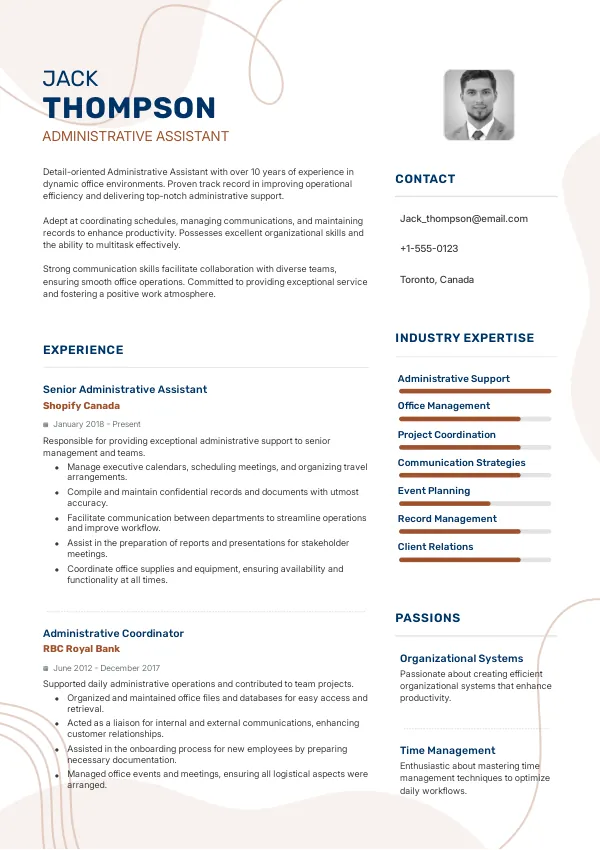
Resumes that are not well-structured can confuse recruiters and ATS. Inconsistent formatting, font sizes, or alignment issues can create a negative first impression.
Example
- Bad: Mixed font styles and sizes throughout the resume.
- Better: Consistent font style and size, clear section headings.
How to fix
- Use a clean, professional format with consistent fonts and spacing.
Mistake #2 – Vague Job Descriptions
Why this hurts
When job descriptions lack detail, recruiters may overlook your qualifications. Generic statements fail to demonstrate your specific contributions and skills.
Example
- Bad: 'Responsible for office tasks.'
- Better: 'Managed scheduling and correspondence for a team of 10, improving communication efficiency by 20%.'
How to fix
- Provide specific accomplishments and quantified results in your job descriptions.
Mistake #3 – Missing Relevant Keywords
Why this hurts
Failure to include relevant keywords can lead to your resume being filtered out by ATS. Recruiters look for specific terms that match the job description.
Example
- Bad: Omitting key skills listed in the job posting.
- Better: Incorporating keywords such as 'time management' and 'customer service.'
How to fix
- Analyze the job description and include relevant keywords that highlight your skills.
Mistake #4 – Lack of Customization
Why this hurts
Using a one-size-fits-all resume can signal to recruiters that you are not genuinely interested in the position. Customization shows you understand the role and its requirements.
Example
- Bad: Using the same resume for multiple applications.
- Better: Tailoring your resume for each application to highlight relevant experience.
How to fix
- Customize your resume for each job application, emphasizing relevant skills and experiences.
Mistake #5 – Ignoring Contact Information
Why this hurts
Missing or incorrect contact information can prevent recruiters from reaching you. It's a basic requirement that is often overlooked.
Example
- Bad: Omitting a phone number or email address.
- Better: Including a professional email and a phone number.
How to fix
- Always double-check that your contact information is complete and accurate.
Mistake #6 – Not Highlighting Soft Skills
Why this hurts
Administrative roles require a range of soft skills. Not mentioning these can make you appear less qualified for the role.
Example
- Bad: Listing only technical skills.
- Better: Including skills such as 'problem-solving' and 'communication.'
How to fix
- Incorporate relevant soft skills into your resume, providing examples of how you've used them.
Mistake #7 – Overusing Buzzwords
Why this hurts
While buzzwords can be effective, overusing them can make your resume sound insincere or generic. Recruiters prefer genuine descriptions.
Example
- Bad: 'Dynamic team player with a proven track record.'
- Better: 'Collaborated with a team to streamline office processes, enhancing productivity.'
How to fix
- Use specific language that accurately reflects your experiences rather than generic buzzwords.
Mistake #8 – Not Including Relevant Certifications
Why this hurts
Certifications relevant to administrative roles can set you apart. Omitting them may cause you to miss out on opportunities.
Example
- Bad: Leaving out certifications.
- Better: Including certifications such as 'Certified Administrative Professional.'
How to fix
- List any relevant certifications in a dedicated section to enhance your qualifications.


ATS-Specific Mistakes
Many administrative resumes fall short due to ATS-related issues. This can include improper file types, lack of keywords, or overly complicated formatting that confuses the system. Often, candidates are unaware of these issues unless they undergo a thorough review. To ensure your resume is ATS-friendly, consider tools or services like mistakes.cv for an expert evaluation.
Mistakes by Experience Level
Entry-Level
Entry-level candidates often struggle with demonstrating value. They might focus too much on education without highlighting transferable skills gained through internships or part-time jobs.
Mid-Level
Mid-level applicants should emphasize their experience and achievements. They often make the mistake of being too broad or failing to quantify results from their previous roles.
Senior/Lead
Senior applicants need to clearly signal their leadership capabilities. A common mistake is failing to showcase strategic contributions or relevant management experiences.
Ensure your resume is ATS-compatible and effective.
Check ItQuick Checklist Before Applying
- Ensure consistent formatting throughout your resume.
- Customize your resume for each application.
- Include relevant keywords from the job description.
- List specific accomplishments and quantify results.
- Highlight both hard and soft skills relevant to the role.
- Double-check your contact information.
- Avoid the overuse of buzzwords.
- Include any relevant certifications.
- Review for ATS compatibility.
- Seek an external review of your resume.
Frequently Asked Questions
What should I include in my administrative resume?
Focus on relevant experience, skills, and certifications that align with the job description.
How do I make my resume ATS-friendly?
Use standard formatting, incorporate keywords, and avoid graphics or unusual fonts.
Is it necessary to customize my resume for each job?
Yes, tailoring your resume shows you understand the specific requirements of the role.
What common mistakes should I avoid on my resume?
Avoid vague descriptions, poor formatting, and missing contact information.
How can I get feedback on my resume?
Consider using a professional service like mistakes.cv for a comprehensive review.
Take Action to Improve Your Resume
Don’t let common resume mistakes hold you back from your desired administrative position. Take the first step towards improvement by reviewing your resume today.
For a thorough check, consider using mistakes.cv for expert insights that can enhance your chances of landing that interview.

 UAE
UAE Qatar
Qatar Saudi Arabia
 South Africa
 Brazil
 USA
USA Canada
 Australia
 United Kingdom
 New Zealand
 Singapore
 Germany
 France
 Spain
Spain Greece
 Italy
Italy India
India Philippines
 Malaysia
 Indonesia
 South Korea
 Japan
Japan