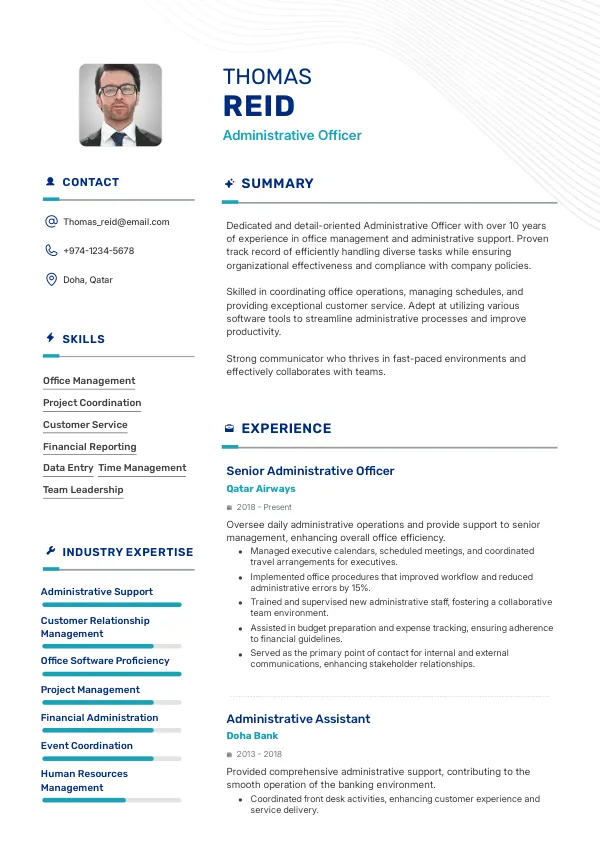
Understanding Administrative Roles in Qatar
Applying for administrative positions in Qatar can be competitive. Many candidates overlook key resume mistakes that can severely hinder their chances of landing an interview. It’s crucial to ensure your resume is polished and free of errors that recruiters notice. A comprehensive review of your resume can help you avoid common pitfalls and improve your application.
How Recruiters Evaluate Administrative Resumes
Recruiters in Qatar often use Applicant Tracking Systems (ATS) to screen resumes. They look for specific keywords, formatting, and overall structure to determine if a candidate fits the role. Many applicants are rejected due to mistakes they are unaware of, such as poor formatting or vague job descriptions. Having an external review of your resume can highlight these issues before you submit your application.
Understanding how your resume is evaluated can help you tailor it effectively for the job you desire.
Ensure your resume stands out and accurately reflects your skills.
Get ReviewedCommon Resume Mistakes for Administrative Roles
Mistake #1 – Poor Formatting
Why this hurts
Recruiters quickly scan resumes, and poor formatting can make it difficult for them to find key information. If your resume is cluttered or inconsistently formatted, it may be rejected at first glance.
Example
- Bad: Inconsistent font sizes and styles throughout the resume.
- Better: Uniform font and size, with clear section headings.
How to fix
- Use a clean layout with consistent fonts and sizes. Ensure that headings are distinct and easy to read.
Mistake #2 – Vague Job Descriptions
Why this hurts
Vague descriptions do not convey your skills or accomplishments effectively. Recruiters need to understand what you contributed in previous roles.
Example
- Bad: "Responsible for office tasks."
- Better: "Managed scheduling and correspondence for a team of 10, improving communication efficiency by 30%."
How to fix
- Use specific examples and quantify achievements to demonstrate your impact.
Mistake #3 – Ignoring Keywords
Why this hurts
ATS software scans for relevant keywords related to the job description. Omitting these keywords can lead to your resume being filtered out.
Example
- Bad: A resume without specific terms like 'administrative support' or 'data entry.'
- Better: Including these terms strategically in your resume.
How to fix
- Carefully read the job description and incorporate relevant keywords into your resume.
Mistake #4 – Lack of Customization
Why this hurts
A generic resume fails to stand out. Recruiters appreciate applicants who tailor their resumes to specific job postings.
Example
- Bad: Sending the same resume to multiple employers.
- Better: Customizing your resume for each application by emphasizing relevant experience.
How to fix
- Revise your resume for each job application, highlighting the most relevant experiences and skills.
Mistake #5 – Unclear Seniority Signals
Why this hurts
Recruiters need to understand your level of experience. Lack of clear indicators can mislead them about your suitability for a role.
Example
- Bad: Listing job titles that do not reflect your level of responsibility.
- Better: Clearly indicating roles such as 'Administrative Assistant' or 'Office Manager' with appropriate descriptions.
How to fix
- Ensure that your job titles and descriptions accurately reflect your responsibilities and seniority.
Mistake #6 – Overloading with Irrelevant Information
Why this hurts
Including unnecessary details can distract recruiters from your key qualifications. They prefer concise, relevant information.
Example
- Bad: Listing every job you’ve ever had, regardless of relevance.
- Better: Focusing on jobs related to administrative tasks.
How to fix
- Limit your experience to the most relevant roles and skills that match the job you are applying for.
Mistake #7 – Using a Non-Professional Email
Why this hurts
An unprofessional email address can create a negative impression. Recruiters expect a straightforward email format.
Example
- Bad: [email protected]
- Better: [email protected]
How to fix
- Create a professional email address using your name for job applications.
Mistake #8 – Not Including Relevant Skills
Why this hurts
Failing to mention important skills can misrepresent your capabilities. Recruiters need to see your qualifications at a glance.
Example
- Bad: Leaving skills section blank.
- Better: Listing skills like 'Microsoft Office Suite,' 'communication,' and 'time management.'
How to fix
- Include a skills section that highlights both technical and soft skills relevant to administrative roles.


Common ATS-Specific Mistakes
Many candidates face challenges with ATS systems that screen resumes based on specific criteria. Issues such as incorrect file formats, improper use of headers, or lack of keywords can lead to automatic rejection. It's difficult to diagnose these problems without a professional review, as many candidates are unaware of the ATS requirements.
Mistakes by Experience Level
Entry-level
Entry-level candidates often struggle with limited experience. Common mistakes include failing to emphasize transferable skills and using overly technical jargon. Tailoring resumes to highlight relevant coursework or internships can be beneficial.
Mid-level
Mid-level applicants should focus on quantifiable achievements. Mistakes often include vague descriptions of responsibilities and not tailoring their resumes for specific roles. Highlighting leadership roles and measurable outcomes is essential.
Senior
Senior candidates must demonstrate strategic impact. Common errors include focusing too much on tasks rather than outcomes and failing to communicate their vision. It’s crucial to showcase accomplishments that demonstrate leadership and strategic thinking.
Maximize your chances with a professional resume review.
Review NowQuick Checklist for Your Resume
- Check for consistent formatting throughout.
- Use specific, quantifiable job descriptions.
- Incorporate relevant keywords from the job description.
- Customize your resume for each application.
- Clearly indicate your level of seniority.
- Avoid irrelevant information.
- Use a professional email address.
- Include a relevant skills section.
- Review for ATS compatibility.
- Seek an external review for hidden mistakes.
Frequently Asked Questions
What is the best format for an administrative resume in Qatar?
A clean, chronological format is often preferred. Ensure it is easy to read and highlights your key skills and experiences relevant to administrative roles.
How important are keywords in my resume?
Keywords are crucial for getting past ATS and grabbing the attention of recruiters. Use relevant terms from the job description to increase your chances.
Should I include all my work experiences?
Focus on relevant experiences that align with the job you are applying for. Quality over quantity is key.
How can I ensure my resume is ATS-friendly?
Use standard fonts, avoid complex formatting, and include relevant keywords. An ATS review can help identify potential issues.
What if I'm unsure about my resume content?
Seeking a professional review can provide clarity and help you identify areas for improvement.
Take the Next Step Towards Your Dream Job
Don't let common mistakes hold you back from landing your ideal administrative position in Qatar. Review your resume today to ensure it reflects your skills and experience accurately.
Consider using mistakes.cv to get a professional review or to double-check for hidden errors that could impact your job search.

 UAE
UAE Qatar
Qatar Saudi Arabia
 South Africa
 Brazil
 USA
USA Canada
 Australia
 United Kingdom
 New Zealand
 Singapore
 Germany
 France
 Spain
Spain Greece
 Italy
Italy India
India Philippines
 Malaysia
 Indonesia
 South Korea
 Japan
Japan