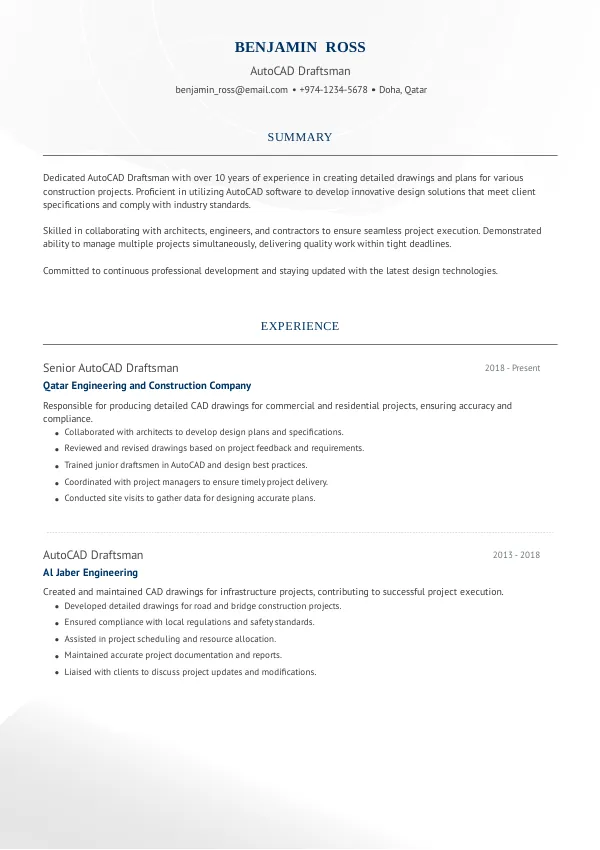
Understanding the Importance of a Flawless Resume
As an AutoCAD Draftsman in Qatar, your resume serves as the first impression to potential employers. Mistakes in your CV can significantly reduce your chances of securing an interview. Many candidates overlook critical errors that can lead to rejection. It’s wise to review your resume to ensure it meets local standards and avoids common pitfalls.
How Recruiters Evaluate Your Resume
Recruiters in Qatar typically use ATS systems to streamline their hiring process. These systems scan resumes for specific keywords and formats before they even reach human eyes. As a result, applicants often get rejected for errors they may not notice. A thorough external review can help identify potential issues in your submission.
Understanding how your resume is evaluated allows you to tailor it effectively. Consider using mistakes.cv to ensure your CV meets the expectations of recruiters and ATS systems alike.
Ensure your resume is ATS-friendly and error-free.
Review NowCommon Resume Mistakes for AutoCAD Draftsmen
Mistake #1 – Poor Formatting
Why this hurts
A cluttered layout can make your resume difficult to read, causing recruiters to overlook key information. ATS systems may struggle to parse poorly formatted resumes, leading to automatic rejections.
Example
- Bad: Multiple font types and sizes with inconsistent spacing.
- Better: A clean, uniform layout with consistent font and spacing.
How to fix
- Use a single font type, maintain consistent sizes, and ensure proper spacing throughout your CV.
Mistake #2 – Lack of Relevant Keywords
Why this hurts
Not including industry-specific keywords can lead to your resume being filtered out by ATS. These systems look for skills and terminologies relevant to the role of an AutoCAD Draftsman.
Example
- Bad: "I worked on various projects."
- Better: "Utilized AutoCAD to design detailed architectural plans."
How to fix
- Review job descriptions for commonly used keywords and integrate them into your CV.
Mistake #3 – Ambiguous Job Descriptions
Why this hurts
Vague descriptions of your past roles can confuse recruiters and fail to demonstrate your expertise. Clear, detailed descriptions help to highlight your skills and accomplishments.
Example
- Bad: "Responsible for drafting."
- Better: "Created and modified 2D and 3D drawings for commercial projects."
How to fix
- Use specific action verbs and quantify your achievements where possible.
Mistake #4 – Ignoring Experience Levels
Why this hurts
Resumes that do not reflect your experience level can mislead recruiters about your suitability for the position. Entry-level candidates and seasoned professionals have different expectations.
Example
- Bad: "Worked on projects." (for an entry-level position)
- Better: "Assisted senior draftsmen in developing comprehensive project designs." (for an entry-level position)
How to fix
- Align your CV content with the expectations of your career level.
Mistake #5 – Overly Lengthy Resumes
Why this hurts
Recruiters often spend only a few seconds reviewing each CV. An overly lengthy resume can deter them from reading further, leading to missed opportunities.
Example
- Bad: A four-page CV with excessive detail.
- Better: A two-page CV focusing on relevant experience and skills.
How to fix
- Be concise and focus on the most relevant information for the role.
Mistake #6 – Missing Contact Information
Why this hurts
Failing to include your contact details can lead to missed opportunities and confusion for recruiters trying to reach you.
Example
- Bad: No phone number or email listed.
- Better: Clear listing of email, phone number, and LinkedIn profile.
How to fix
- Ensure your contact information is prominently displayed at the top of your CV.
Mistake #7 – Not Tailoring Your CV
Why this hurts
A generic CV may not resonate with recruiters looking for specific qualifications. Tailoring your CV to the job description can significantly enhance your chances.
Example
- Bad: Sending the same CV for every application.
- Better: Customizing your CV for each application to highlight relevant skills.
How to fix
- Adjust your CV to emphasize the qualifications listed in the job posting.
Mistake #8 – Spelling and Grammatical Errors
Why this hurts
Errors can create a perception of carelessness and lack of attention to detail, which are critical in drafting roles.
Example
- Bad: "I am an Autocad Draftsman with many experience."
- Better: "I am an AutoCAD Draftsman with extensive experience."
How to fix
- Proofread your CV multiple times and consider using professional services to ensure accuracy.


Common ATS Mistakes to Avoid
ATS systems can be unforgiving, and several common mistakes can lead to automatic rejection. For instance, submitting your CV in a non-standard format (like images or unusual file types) can hinder parsing. Many candidates don’t realize that ATS may also overlook certain keywords if they are not in the right context. To ensure your CV is ATS-compliant, consider using mistakes.cv for a professional assessment.
Tailoring Mistakes by Experience Level
Entry-Level
Entry-level candidates often struggle with showcasing relevant projects or internships. They should highlight educational achievements and any applicable skills. A well-structured CV can make a difference.
Mid-Level
Mid-level professionals should focus on leadership roles and project management experience. They must express their value and contributions clearly to demonstrate readiness for senior positions.
Senior/Lead
Senior draftsmen should emphasize strategic thinking and their ability to lead teams. Their resumes must reflect their extensive experience and impact on projects, signaling their seniority effectively.
Get expert feedback on your CV for better results.
Get FeedbackQuick Checklist Before You Apply
- Ensure your resume is well-formatted and easy to read.
- Include relevant keywords from the job description.
- Provide clear and specific descriptions of your experience.
- Tailor your resume for each application.
- Keep your CV concise, ideally two pages.
- Double-check for spelling and grammatical errors.
- List your contact information clearly.
- Use action verbs to demonstrate your contributions.
- Quantify achievements wherever possible.
- Review your CV with a professional service like mistakes.cv.
Frequently Asked Questions
What is the ideal length for an AutoCAD Draftsman CV?
The ideal length is typically two pages, focusing on relevant experiences.
How often should I update my resume?
Update your resume after any significant project or job change to reflect current skills.
Should I include my education details?
Yes, especially if you are an entry-level candidate. Highlight relevant courses and degrees.
Can I use templates for my resume?
Templates can be helpful, but ensure they are ATS-friendly and customizable.
How can I make my resume stand out?
Tailor your CV to the job description, focus on achievements, and ensure clarity.
Take the Next Step Towards a Winning Resume
Don’t let your resume hold you back from securing an interview for your dream job. Reviewing and improving your CV can enhance your chances significantly. Use mistakes.cv for a comprehensive review to identify hidden errors and optimize your presentation.
Start your journey towards an impactful resume today!

 UAE
UAE Qatar
Qatar Saudi Arabia
 South Africa
 Brazil
 USA
USA Canada
 Australia
 United Kingdom
 New Zealand
 Singapore
 Germany
 France
 Spain
Spain Greece
 Italy
Italy India
India Philippines
 Malaysia
 Indonesia
 South Korea
 Japan
Japan