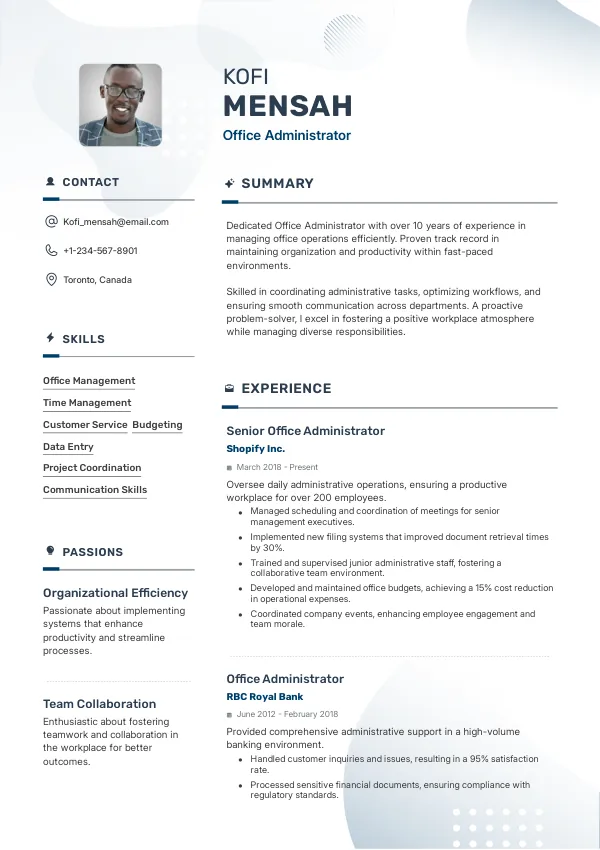
Introduction to Office Administrator Resumes
Applying for an Office Administrator position in Canada requires a precise and polished resume. Many candidates overlook key elements that can result in their resumes being rejected. Common mistakes can block your path to interviews and job offers.
Consider reviewing your resume with a professional service like mistakes.cv to ensure you avoid these pitfalls and enhance your chances of success.
How Recruiters Evaluate Office Administrator Resumes
Recruiters in Canada often use ATS (Applicant Tracking Systems) to filter resumes. They look for relevant keywords and proper formatting that aligns with the job description. Many applicants are unaware of minor mistakes that can lead to outright rejections.
Having an external review can help identify these issues before you submit your application, increasing your chances of making a positive impression.
Ensure your resume stands out with expert insights.
Get StartedCommon Resume Mistakes for Office Administrators
Mistake #1 – Poor Formatting
Why this hurts
Recruiters prefer clean, organized resumes that are easy to read. Poor formatting can distract from your qualifications.
Example
- Bad: Using varying fonts and sizes throughout the resume.
- Better: Consistent font, size, and spacing.
How to fix
- Use a simple, professional layout with clear headings and bullet points.
Mistake #2 – Lack of Keywords
Why this hurts
ATS scans for specific keywords related to the job. Missing these can lead to rejection even if you’re qualified.
Example
- Bad: Not including terms like “office management” or “scheduling.”
- Better: Integrating relevant keywords from the job description.
How to fix
- Analyze job listings and include specific keywords in your resume.
Mistake #3 – Unclear Job Titles
Why this hurts
Recruiters may overlook your experience if job titles are vague or inconsistent with industry standards.
Example
- Bad: “Admin Wizard” as a job title.
- Better: “Administrative Assistant” or “Office Administrator.”
How to fix
- Use clear and conventional job titles that reflect your role accurately.
Mistake #4 – Irrelevant Experience
Why this hurts
Including unrelated work experience can dilute your qualifications and confuse recruiters.
Example
- Bad: Listing a previous job as a waiter without relevance.
- Better: Focusing on administrative or clerical roles.
How to fix
- Highlight experiences that directly relate to the Office Administrator role.
Mistake #5 – Errors and Typos
Why this hurts
Small mistakes can signal a lack of attention to detail, a critical quality for Office Administrators.
Example
- Bad: “Organised meetings and events.”
- Better: “Organized meetings and events.”
How to fix
- Proofread your resume carefully or have it reviewed by a professional.
Mistake #6 – Overly Long Resumes
Why this hurts
Recruiters often prefer concise resumes that get straight to the point. Lengthy resumes can be overwhelming.
Example
- Bad: A two-page resume filled with unnecessary details.
- Better: A one-page resume that highlights key skills and experiences.
How to fix
- Limit your resume to one page unless you have extensive experience.
Mistake #7 – Missing Contact Information
Why this hurts
Without clear contact details, recruiters cannot reach you for interviews.
Example
- Bad: Omitting your phone number or email address.
- Better: Clearly listing your phone number and professional email.
How to fix
- Make sure your contact information is complete and easy to find.
Mistake #8 – Not Tailoring Your Resume
Why this hurts
Generic resumes do not effectively show how your skills meet the specific needs of the employer.
Example
- Bad: Using the same resume for every job application.
- Better: Tailoring your resume for each job by highlighting relevant experiences.
How to fix
- Customize your resume for each application to better align with the job description.


ATS-Specific Resume Mistakes
ATS systems can misinterpret resumes if they are not formatted correctly. For example, using images or unconventional layouts can confuse the software, leading to missed qualifications. Many candidates are unaware of how ATS scans for keywords and may fail to include essential terms.
To avoid ATS-related errors, consider getting your resume reviewed by experts who understand how these systems work, such as mistakes.cv.
Mistakes by Experience Level
Entry-Level
Entry-level candidates often struggle with presenting relevant experience. Common mistakes include using overly simplistic language and neglecting internships or volunteer work that showcases relevant skills.
Mid-Level
Mid-level professionals may fail to demonstrate leadership and project management experience, which are critical at this level. Tailoring accomplishments and quantifying results can enhance their resumes.
Senior / Lead
Senior candidates should highlight strategic impact and leadership qualities. Mistakes often include focusing on day-to-day tasks rather than broader contributions to organizational success.
Identify potential issues that could hinder your application.
Review NowQuick Checklist for Your Resume
- Ensure consistent formatting throughout the document.
- Incorporate relevant keywords from job descriptions.
- Use clear and conventional job titles.
- Highlight only relevant work experience.
- Proofread for spelling and grammatical errors.
- Keep your resume concise, ideally one page.
- Include up-to-date contact information.
- Tailor your resume for each application.
- Use bullet points for clarity and readability.
- Check for ATS-friendly formatting.
Frequently Asked Questions
What is the ideal length for an Office Administrator resume?
Typically, one page is ideal unless you have extensive experience to showcase.
How often should I update my resume?
Update your resume regularly, especially after acquiring new skills or experiences.
Should I include references on my resume?
It's best to state 'References available upon request' rather than listing them directly on your resume.
How can I make my resume stand out?
Tailor your resume to each job application by emphasizing relevant experiences and skills.
Can I use a functional resume format?
While functional formats can highlight skills, they may confuse some recruiters; a chronological format is often preferred.
Take Action Now
Don’t let your resume mistakes hold you back from landing that Office Administrator role. Review your resume carefully, and consider using mistakes.cv for a professional assessment to uncover hidden issues.
Improving your resume is a crucial step towards securing an interview, so take the first step today!

 UAE
UAE Qatar
Qatar Saudi Arabia
 South Africa
 Brazil
 USA
USA Canada
 Australia
 United Kingdom
 New Zealand
 Singapore
 Germany
 France
 Spain
Spain Greece
 Italy
Italy India
India Philippines
 Malaysia
 Indonesia
 South Korea
 Japan
Japan