Introduction
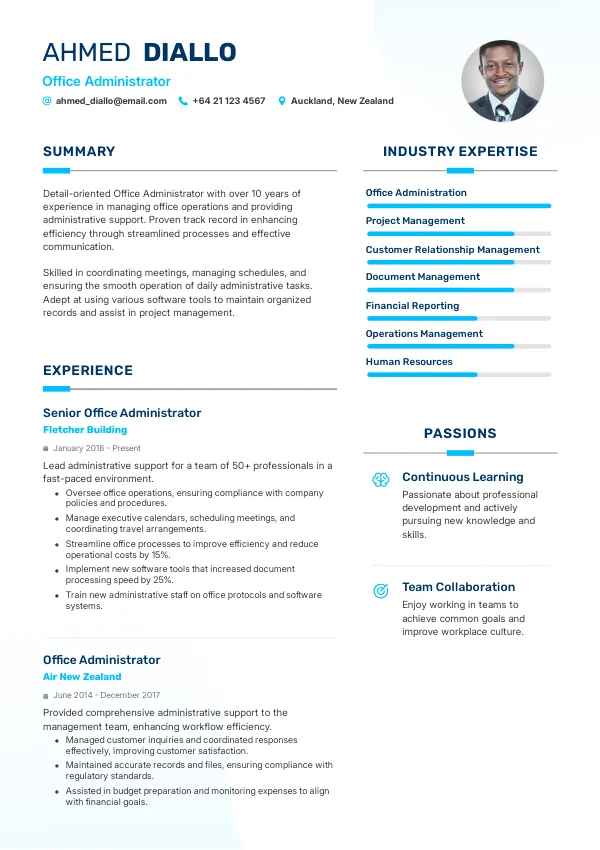
As an Office Administrator in New Zealand, your resume serves as your first impression on potential employers. With a competitive job market, it's vital to avoid common mistakes that can hinder your chances of landing an interview. Even minor errors can lead to missed opportunities, so it’s prudent to review your resume thoroughly before submitting it. Consider using mistakes.cv to ensure your resume is error-free and tailored for success.
How Recruiters Evaluate Resumes
Recruiters in New Zealand often use Applicant Tracking Systems (ATS) to screen resumes before they even reach human eyes. This means that common mistakes can lead to automatic rejections. Many candidates are unaware of these issues, making a professional review essential to uncover hidden problems. Understanding how recruiters evaluate resumes will help you create a more compelling application.
Key factors include formatting, clarity, and relevant keywords that align with the job description. A thorough review can catch mistakes you might overlook, so consider consulting mistakes.cv for a second opinion.
Get a professional review to eliminate errors and boost your chances.
Review NowCommon Resume Mistakes
Mistake #1 – Poor Formatting
Why this hurts
Inconsistent formatting can distract recruiters and make your resume look unprofessional. Clear, organized layouts are critical for readability.
Example
- Bad: Mixed font sizes and styles across sections.
- Better: Consistent font size and style throughout the document.
How to fix
- Choose a clean, professional template and stick to one font style.
Mistake #2 – Lack of Relevant Keywords
Why this hurts
ATS systems filter resumes based on keywords from job descriptions. Missing relevant terms can lead to rejection.
Example
- Bad: Using vague terms like 'administrative tasks.'
- Better: Specific phrases like 'calendar management' or 'scheduling appointments.'
How to fix
- Tailor your resume for each job application by incorporating keywords from the job listing.
Mistake #3 – Overloading with Jargon
Why this hurts
Using excessive jargon can confuse recruiters and obscure your actual skills and experiences.
Example
- Bad: Phrases like 'synergistic frameworks' without context.
- Better: Clear descriptions of your responsibilities and achievements.
How to fix
- Use straightforward language and explain any technical terms briefly.
Mistake #4 – Omitting Key Achievements
Why this hurts
Focusing solely on duties without mentioning accomplishments can make your resume less impactful.
Example
- Bad: "Responsible for managing office supplies."
- Better: "Reduced office supply costs by 20% through strategic vendor negotiations."
How to fix
- Quantify your achievements to demonstrate your impact.
Mistake #5 – Ignoring the Job Description
Why this hurts
Not aligning your resume with the specific requirements of the job can signal a lack of interest.
Example
- Bad: Generic resume that doesn’t mention specific skills listed in the job ad.
- Better: Directly addresses skills and experiences requested.
How to fix
- Customize your resume for each application by mirroring the job description language.
Mistake #6 – Spelling and Grammar Errors
Why this hurts
Simple typos can create an impression of carelessness and lack of attention to detail.
Example
- Bad: "Resposible for managing files."
- Better: "Responsible for managing files."
How to fix
- Proofread your resume multiple times and consider a professional review to catch errors.
Mistake #7 – Using an Unprofessional Email Address
Why this hurts
Your email address is a reflection of your professionalism. An unprofessional address can lead to quick rejection.
Example
- Bad: "[email protected]"
- Better: "[email protected]"
How to fix
- Create a simple email address that includes your name.
Mistake #8 – Not Including Relevant Experience
Why this hurts
Failing to highlight your relevant experience can cause recruiters to overlook your qualifications.
Example
- Bad: Listing unrelated jobs without context.
- Better: Highlighting transferable skills from past roles.
How to fix
- Focus on experiences that showcase your suitability for the Office Administrator role.


ATS-Specific Issues
ATS systems can misinterpret certain formats and structures, leading to important information being lost. For example, using tables or graphics may confuse the ATS, resulting in parsing errors. It's essential to keep your resume simple and text-based to ensure compatibility. ATS-related issues are often hard to diagnose on your own, so consider an automated check or a review from mistakes.cv to identify potential pitfalls.
Mistakes by Experience Level
Entry-Level
Entry-level candidates often struggle with showcasing transferable skills. Highlighting relevant coursework or volunteer work can significantly enhance your credibility. Make sure to tailor your resume for each role to reflect your adaptability.
Mid-Level
Mid-level applicants should focus on demonstrating leadership and project management abilities. Failing to quantify achievements can make your experience appear less impactful. Use specific examples to illustrate your contributions.
Senior / Lead
Senior candidates need to showcase strategic thinking and mentorship capabilities. Avoid generic statements and instead present clear examples of your leadership outcomes. Tailor your resume to reflect the higher expectations for senior roles.
Ensure your resume is ATS-friendly and stands out to recruiters.
Check ATSQuick Checklist Before Applying
- Maintain consistent formatting throughout your resume.
- Incorporate keywords from the job listing.
- Quantify your achievements where possible.
- Proofread for spelling and grammar errors.
- Use a professional email address.
- Highlight relevant experience clearly.
- Keep the layout simple for ATS compatibility.
- Tailor your resume for each job application.
- Ensure your contact information is up-to-date.
- Seek a professional review for hidden mistakes.
FAQs About Office Administrator Resumes
What should I include in my Office Administrator resume?
Focus on relevant skills, achievements, and tailored experiences that match the job description.
How can I make my resume stand out?
Highlight quantifiable achievements and tailor your CV to each job application for better visibility.
What common mistakes should I avoid?
Avoid formatting inconsistencies, jargon, and spelling errors. Always customize for the role.
How long should my resume be?
For most roles, a one to two-page resume is ideal, depending on your experience level.
Can a professional review help my chances?
Yes, a professional review can identify mistakes you may overlook and enhance your resume's effectiveness.
Take Action Now
Your resume is your key to unlocking job opportunities as an Office Administrator in New Zealand. Don’t leave it to chance; review and refine your CV to showcase your best self. Consider using mistakes.cv for a thorough check-up to ensure it's free of errors and tailored for success.
Start improving your chances today by getting your resume reviewed!

 UAE
UAE Qatar
Qatar Saudi Arabia
 South Africa
 Brazil
 USA
USA Canada
 Australia
 United Kingdom
 New Zealand
 Singapore
 Germany
 France
 Spain
Spain Greece
 Italy
Italy India
India Philippines
 Malaysia
 Indonesia
 South Korea
 Japan
Japan