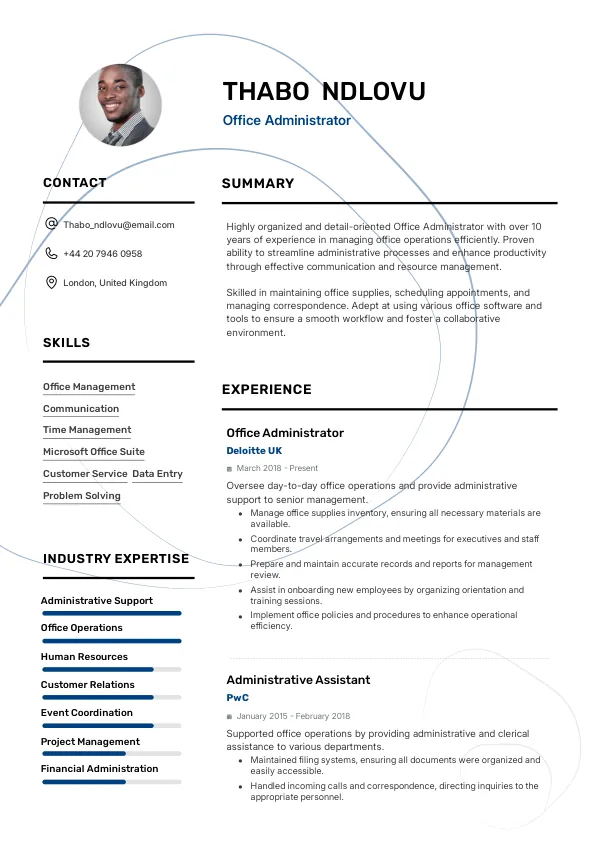
Understanding the Role of an Office Administrator
As an Office Administrator in the UK, your resume must reflect a strong attention to detail and organisational skills. With fierce competition for these positions, any mistakes can hinder your chances of landing an interview. Many candidates overlook common errors that can lead to rejection. It's essential to review your resume early to avoid these pitfalls and improve your chances with recruiters.
How Recruiters Evaluate Office Administrator Resumes
Recruiters in the UK typically review resumes quickly, often spending less than 30 seconds on the initial scan. They look for clear formatting, relevant experience, and keywords that match the job description. Many candidates are rejected due to unnoticed issues, which is why an external review can be invaluable. Using services like mistakes.cv can help you identify these hidden mistakes.
ATS systems further complicate the process, filtering resumes based on specific criteria. If your resume doesn't meet these criteria, it may not even reach a recruiter’s desk.
Get expert advice to enhance your resume and landing interviews.
Get StartedCommon Resume Mistakes for Office Administrators
Mistake #1 – Poor Formatting
Why this hurts
Inconsistent formatting can confuse recruiters and make a resume look unprofessional. Clean and uniform layouts are crucial.
Example
- Bad: Using different font sizes and styles across sections.
- Better: Maintaining a consistent font style and size throughout.
How to fix
- Choose one font type and size for the entire document, ensuring uniformity.
Mistake #2 – Lack of Keywords
Why this hurts
Many resumes fail to include important keywords from the job description, which can lead to rejection by ATS systems.
Example
- Bad: "I handled administration tasks."
- Better: "Managed office administration, scheduling, and communication tasks."
How to fix
- Carefully review the job description and incorporate relevant keywords into your resume.
Mistake #3 – Unclear Job Descriptions
Why this hurts
Vague job descriptions fail to convey your accomplishments and responsibilities clearly.
Example
- Bad: "Responsible for office duties."
- Better: "Oversaw daily office operations, improving efficiency by 20%."
How to fix
- Use specific metrics and outcomes to describe your previous roles.
Mistake #4 – Ignoring the Cover Letter
Why this hurts
Not including a cover letter can signal a lack of interest or effort to recruiters.
Example
- Bad: No cover letter submitted.
- Better: A tailored cover letter that complements your resume.
How to fix
- Include a well-crafted cover letter tailored to the job you’re applying for.
Mistake #5 – Typos and Grammatical Errors
Why this hurts
Simple errors can reflect a lack of attention to detail, a critical skill for an Office Administrator.
Example
- Bad: "I am very organized and have good communication skils."
- Better: "I am very organized and possess excellent communication skills."
How to fix
- Proofread your resume multiple times and consider using a grammar-checking tool.
Mistake #6 – Exaggerated Claims
Why this hurts
Overstating your skills can lead to disappointment during interviews.
Example
- Bad: "I am an expert at all office software."
- Better: "Proficient in Microsoft Office Suite and Google Workspace."
How to fix
- Be honest about your skills and provide examples of how you’ve used them.
Mistake #7 – Using Jargon
Why this hurts
Overly technical language can alienate recruiters who may not be familiar with specific terms.
Example
- Bad: "Utilized CRM systems to leverage synergies."
- Better: "Used customer relationship management systems to enhance client interactions."
How to fix
- Use clear and straightforward language that demonstrates your skills without jargon.
Mistake #8 – Not Tailoring the Resume
Why this hurts
Using a generic resume fails to highlight the specific skills required for the job.
Example
- Bad: A one-size-fits-all resume.
- Better: A tailored resume for each application highlighting relevant experience.
How to fix
- Customize your resume for each job application to reflect the skills and experiences that match the job description.


ATS-Specific Mistakes to Avoid
Many candidates do not realise that ATS systems can misinterpret their resumes due to formatting and file type issues. Resumes submitted as PDFs may be improperly parsed, leading to loss of critical information. Additionally, if your resume lacks relevant keywords, the ATS may filter it out entirely. Reviewing your resume with mistakes.cv can help you catch these ATS-related errors that are otherwise difficult to diagnose on your own.
Mistakes Varying by Experience Level
Entry-Level
Entry-level candidates often fail to highlight relevant internships or volunteer work. They should focus on transferable skills and achievements, even if gained in non-professional settings.
Mid-Level
Mid-level professionals may overlook the importance of quantifying accomplishments. Clearly showcasing how they’ve improved processes or saved costs is essential for this experience level.
Senior / Lead
Senior candidates can fall into the trap of using outdated skills or focusing too much on past roles instead of current trends. They should emphasize leadership skills and strategic contributions relevant to the position they seek.
Identify hidden mistakes that could be costing you opportunities.
Review NowQuick Checklist Before Submitting Your Resume
- Ensure consistent formatting throughout.
- Incorporate relevant keywords from the job description.
- Clearly describe job responsibilities with quantifiable achievements.
- Proofread for typos and grammatical errors.
- Include a tailored cover letter.
- Avoid jargon and use clear language.
- Customize your resume for each application.
- Check ATS compatibility by submitting in a standard format.
- Highlight soft skills alongside technical abilities.
- Seek feedback from professionals or use a service like mistakes.cv.
Frequently Asked Questions
What should I include in my Office Administrator resume?
Focus on relevant skills, experience, and achievements related to administration. Tailor each application to match the job description.
How can I make my resume stand out?
Use specific metrics to demonstrate your impact and tailor your resume to highlight the skills that match the job.
Is a cover letter necessary for Office Administrator roles?
While not always required, a well-crafted cover letter can enhance your application by providing context and showing genuine interest.
How do ATS systems affect my resume?
ATS systems filter resumes based on keywords and formatting. If your resume doesn't align with the job description, it may not be seen by recruiters.
Can I get help with my resume?
Yes, using a service like mistakes.cv can provide a professional review and help identify hidden mistakes.
Take Action Now for Your Career
Don't let your resume mistakes hold you back from securing the Office Administrator position you desire. Review your resume today and fix any errors with the help of mistakes.cv.
Improving your resume is a crucial step in your job search. Take the initiative, and give yourself the best chance at landing interviews!

 UAE
UAE Qatar
Qatar Saudi Arabia
 South Africa
 Brazil
 USA
USA Canada
 Australia
 United Kingdom
 New Zealand
 Singapore
 Germany
 France
 Spain
Spain Greece
 Italy
Italy India
India Philippines
 Malaysia
 Indonesia
 South Korea
 Japan
Japan