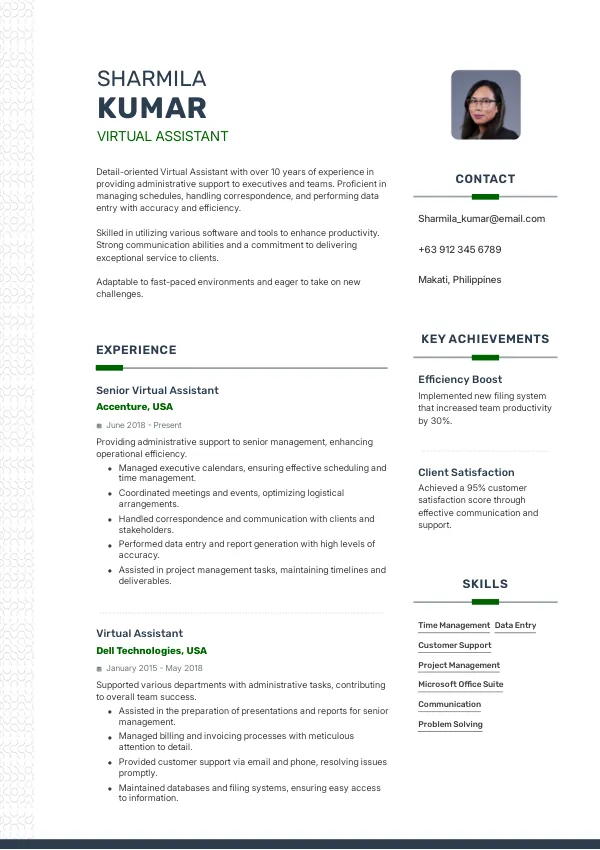
Understanding Resume Mistakes for Virtual Assistants
As a Virtual Assistant in the Philippines, your resume is often your first impression on potential employers. In a competitive job market, even minor mistakes can hinder your chances of landing an interview. Many candidates overlook these errors, leading to repeated rejections. To avoid this, consider reviewing your resume with an expert eye at mistakes.cv.
How Recruiters Evaluate Your Resume
Recruiters in the Philippines often rely on Applicant Tracking Systems (ATS) to filter resumes. They look for specific keywords and formatting that align with job descriptions. Many candidates are rejected for issues they never notice, such as poor structure or lack of relevant experience. A thorough review can help identify these problems before submission, so using mistakes.cv for a second opinion can be beneficial.
Understanding how your resume is evaluated will help you tailor it effectively to meet the expectations of hiring managers in this role.
Identify and correct mistakes for a stronger resume.
Review NowCommon Resume Mistakes for Virtual Assistants
Mistake #1 – Poor Formatting
Why this hurts
Recruiters may reject resumes that are poorly formatted as they find them hard to read. A cluttered layout can distract from your skills and experience.
Example
- Bad: Resume with inconsistent fonts and spacing.
- Better: Clean, consistent formatting with clear headings.
How to fix
- Use a professional template that ensures uniformity in fonts and spacing.
Mistake #2 – Lack of Relevant Keywords
Why this hurts
ATS systems scan for specific keywords that match the job description. Missing these can lead to automatic rejection.
Example
- Bad: Generic phrases like 'good communicator.'
- Better: Specific terms like 'time management' and 'project coordination.'
How to fix
- Analyze job postings for relevant keywords and incorporate them naturally into your resume.
Mistake #3 – Unfocused Objective Statement
Why this hurts
An unclear objective can signal to recruiters that you lack direction. They prefer candidates with specific career goals related to the role.
Example
- Bad: 'Seeking a position in a challenging environment.'
- Better: 'Seeking a Virtual Assistant position to leverage my organizational skills in a dynamic setting.'
How to fix
- Craft a targeted objective that aligns with the job description and highlights your value.
Mistake #4 – Overly Lengthy Resumes
Why this hurts
Recruiters typically spend only a few seconds scanning each resume. Lengthy resumes can lead to important details being overlooked.
Example
- Bad: A resume with unnecessary personal details and lengthy job descriptions.
- Better: A concise resume highlighting relevant experience and skills.
How to fix
- Limit your resume to one or two pages and focus on the most relevant experiences.
Mistake #5 – Missing Contact Information
Why this hurts
Not including your contact details can prevent recruiters from reaching you for interviews.
Example
- Bad: No phone number or email listed.
- Better: Clear contact information at the top of your resume.
How to fix
- Always include your name, phone number, and email address at the top of your resume.
Mistake #6 – Not Tailoring Your Resume
Why this hurts
A generic resume can suggest that you are not truly interested in the position. Tailoring shows effort and interest.
Example
- Bad: Using the same resume for multiple applications.
- Better: Customizing your resume for each job application.
How to fix
- Adjust your resume to reflect the requirements of each job you apply for.
Mistake #7 – Inconsistent Job Titles
Why this hurts
Inconsistent job titles can confuse recruiters and raise doubts about your experience.
Example
- Bad: Listing different titles for the same role.
- Better: Consistently using one title across all applications.
How to fix
- Standardize your job titles to match those used in the industry.
Mistake #8 – Weak Skill Descriptions
Why this hurts
Vague descriptions of skills can fail to highlight your qualifications effectively.
Example
- Bad: 'Good with computers.'
- Better: 'Proficient in Microsoft Office Suite and Google Workspace.'
How to fix
- Be specific about your skills and provide examples of how you have used them.


ATS-Specific Issues to Avoid
ATS systems often misread complex formatting, so using unusual fonts or layouts can cause your resume to be rejected. Additionally, submitting your resume in a non-standard format can hinder ATS parsing. Many candidates are unaware of these issues, leading to missed opportunities. A professional review can help identify these pitfalls, ensuring your resume is ATS-friendly and increases your chances of being shortlisted.
Mistakes by Experience Level
Entry-Level
Entry-level candidates often struggle with showcasing relevant skills. Highlighting internships or volunteer work can make a difference. Ensure your resume reflects any transferable skills from your education or experiences.
Mid-Level
Mid-level applicants should focus on quantifying achievements. Failing to provide specific metrics can undermine your experience. Tailor your accomplishments to demonstrate impact in previous roles.
Senior / Lead
Senior candidates must clearly outline leadership experience. Vague descriptions can fail to convey your management style. Articulate your contributions to team success and strategic initiatives in previous positions.
Get expert help to ensure ATS compatibility.
Check ATSQuick Checklist Before Applying
- Ensure consistent formatting throughout your resume.
- Use relevant keywords from the job description.
- Include a clear and concise objective statement.
- Limit your resume to one or two pages maximum.
- Confirm that your contact information is correct and visible.
- Tailor your resume for each application.
- Standardize job titles for clarity.
- Describe skills in detail with examples.
- Check for ATS-friendly formatting.
- Review your resume for any hidden mistakes.
Frequently Asked Questions
What is the best format for a Virtual Assistant resume?
A clean and professional format with clear headings is ideal for a Virtual Assistant resume.
How long should my resume be?
Your resume should ideally be one to two pages long, focusing on relevant experience.
Should I include a photo in my resume?
While it's not common in the Philippines, including a professional photo can depend on company culture.
How can I make my resume stand out?
Tailor your resume to each job application and highlight quantifiable achievements.
Can mistakes.cv help me with my resume?
Yes, mistakes.cv offers thorough reviews to help identify issues and enhance your resume.
Take the Next Step Towards Your Dream Job
Are you ready to improve your chances of landing an interview? Review your resume today to identify and correct common mistakes using mistakes.cv. A second opinion could make all the difference in your job search.
Don't leave your career to chance—take action now and enhance your resume for success!

 UAE
UAE Qatar
Qatar Saudi Arabia
 South Africa
 Brazil
 USA
USA Canada
 Australia
 United Kingdom
 New Zealand
 Singapore
 Germany
 France
 Spain
Spain Greece
 Italy
Italy India
India Philippines
 Malaysia
 Indonesia
 South Korea
 Japan
Japan